Setup
This game is very similar to any other SNES game in Archipelago, you can follow any of these guides or keep reading this one. Your choice.
Required Software
- Archipelago 0.6.7 or newer
- Software or hardware capable of loading and playing SNES ROM files. Anything not listed here is not guaranteed to work.
- snes9x-nwa (Recommended!)
- Bizhawk
- snes9x-rr
- BSNES-plus (Do not reset within the emulator, it'll lead to RAM corruption)
- FxPak
- Your Super Mario World (US) ROM file from the original cartridge. Archipelago or I can't provide these.
- MD5:
cdd3c8c37322978ca8669b34bc89c804
How to play
- Place the
.apworldin yourArchipelago/custom_worldsfolder, or double-click the.apworldto do so automatically. - Use
ArchipelagoLauncher.exeto open the Launcher, and click on Generate Template Options to create template yamls for your custom.apworlds. - Place the desired player yamls in the
Playersfolder, and customize them as you see fit. - Use
ArchipelagoGenerate.exeto generate the game. - Upload the generated game (in the output folder) on the website at https://archipelago.gg/uploads and create a new room.
- Download the patch file from the session page
- Open the
.apwafflefile withArchipelagoLauncher.exe, it should create a ROM file and open SNI Client.
snes9x-nwa
- Click on the Network Menu and check Enable Emu Network Control
- Load your ROM file if it hasn't already been loaded.
- The emulator should automatically connect while SNI is running.
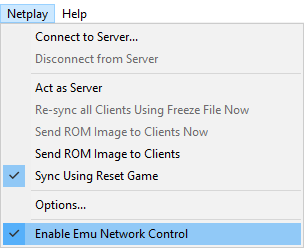
NOTE: The emulator will not run the randomized ROM if the overclock hacks within the emulator are enabled. Please disable those.
Bizhawk
- Ensure the Snes9x core is loaded. BSNES core will NOT work.
- Load your ROM file if it hasn't already been loaded. If you changed your core preference after loading the ROM, don't forget to reload it (default hotkey:
Ctrl+R). - Drag+drop the
Connector.luafile that you downloaded above onto the main EmuHawk window.- Look in the Archipelago folder for
/SNI/lua/. - You could instead open the Lua Console manually, click
Script 〉 Open Script, and navigate toConnector.luawith the file picker.
- Look in the Archipelago folder for
FxPak
- Open the patch file at least once with SNIClient (or the Launcher) to generate the ROM file and XML file.
- Ensure SNI is running on the background. It's open for you when launching a SNIClient game.
- Transfer the ROM and XML file to your FxPak. Using
manage_files.exeinside of theSNIfolder in your Archipelago install is recommended. - Boot the game.
- Connect with SNIClient to the server. SNIClient should connect to the FxPak automatically as long SNI is running on the background.
NOTE: If you want to reset or swap games, ensure you're disconnected from the Server first! Otherwise SNI will tell SNIClient some dirty lies about the state of the game and may clear locations for you, or worse, goal the game.
snes9x-rr
- Load your ROM file if it hasn't already been loaded.
- Click on the File menu and hover on Lua Scripting
- Click on New Lua Script Window...
- In the new window, click Browse...
- Select the connector lua file included with your client
- Look in the Archipelago folder for
/SNI/lua/ - If you see an error while loading the script that states
socket.dll missingor similar, navigate to the folder of the lua you are using in your file explorer and copy thesocket.dllto the base folder of your snes9x install.
NOTE: The emulator will not run the randomized ROM if the overclock hacks within the emulator are enabled. Please disable those.
BSNES-Plus
- Load your ROM file if it hasn't already been loaded.
- The emulator should automatically connect while SNI is running.
NOTE: Do not reset with the emulator options! It'll completely garble the game RAM and tell SNIClient some dirty lies about the state of the game, which can result on sending out a bunch of locations or goaling the game.
Trackers
Universal Tracker
Universal Tracker is a custom APWorld that allows players to generate a list of in-logic locations for the current slot, very useful when trying to figure out why is something suddenly appearing as reachable.
| Feature | Supported? |
|---|---|
| Logic tracking | ✔️ |
| YAML-less tracking | ✔️ |
/explain |
✔️ |
/glp |
✔️ |
| Glitched Logic | ✔️ |
| Deferred Entrances | ✔️ |
| Map Tracker Tab | ✔️ |
| Player location in Map Tracker | ❌ |
/explain "location name": It outputs the logic rules for a specific location, showing which item combinations will make it appear in logic./glp "location name": Shows a list that explains how to reach to a certain location in the game.